Everyday money
Record income and expenses, organize categories and review your history by day or month.
 Favuto
ANDROID · CURRENTLY IN PRIVATE PILOT
Bring your accounts, everyday spending and future plans into view. With an AI assistant to help you think it through.
Your records. Your decisions.
Public release is in preparation. Features shown are implemented in the pilot; availability depends on your version and connection.
YOUR FINANCIAL PICTURE
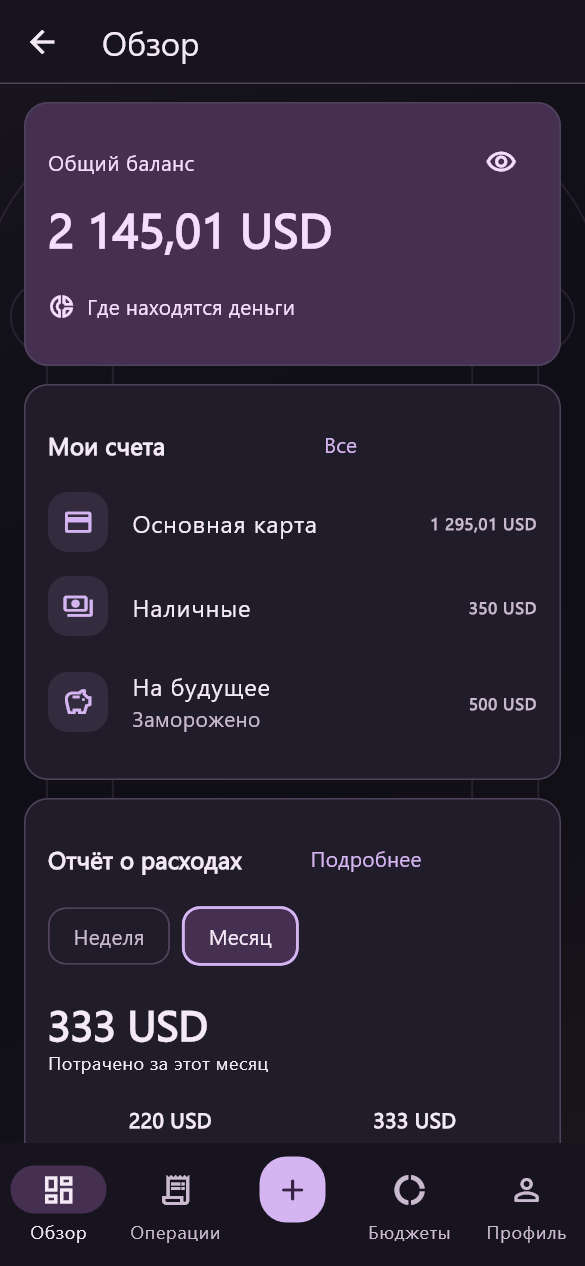
See the details without losing the bigger picture. Keep a record of what comes in, what goes out and what you want to set aside.
Record income and expenses, organize categories and review your history by day or month.
Track cash, cards and savings in multiple currencies. Record transfers between your accounts.
Keep track of debts and loans, plan recurring bills and work toward savings goals.
Review spending reports and budgets based on your own records. Internal transfers stay separate from spending.
Favuto is a personal record-keeping tool. Recording a transfer or payment does not move money through a bank.
AI FINANCIAL ASSISTANT
Talk about your spending, priorities and savings plans. Give the assistant access to the sources you choose, and explore your finances in everyday language.
Where did most of my spending go?
Help me think through a monthly budget.
How can I plan for a savings goal?
Example questions · illustrative, not a live chat
Write a message or send a voice recording for transcription. An internet connection and a connected AI account are needed.
Review the assistant’s source permissions and memory settings. Enabled context is processed by Favuto and OpenAI.
The current release focuses on discussion and analysis. Enter or change financial records in the Finance screens. AI can make mistakes.
FROM A RECEIPT TO A RECORD
Send a receipt photo for recognition, check the extracted details and confirm the record yourself. A photo never becomes an expense without your review.
Recognition sends the image to Favuto and OpenAI with your consent.
Review the amount, currency, date and suggested categories. Correct recognition mistakes.
Confirm the financial record in the app. Keep your own records accurate.
Receipt recognition requires a connected AI service. Financial records and original photos have different storage and sync behavior.
Core records are stored on your device. Online AI, optional finance sync and push notifications use additional services. Each has a different purpose.
Favuto
Favuto brings personal finance, planning and AI conversations into one app. The aim is simple: make everyday information easier to organize and decisions easier to think through.
Meet Favuto